
No-Code to Any-Code

Create Embedded Motion Control Software in manageable steps.

Motorcortex gets your product development started fast with a configurable turn-key Motion Control Application. 

Modify the example User Interface and Digital Twin to your liking and add the features you miss in small service programs. 

Or take control and use the SDK and application template code to make your own software but still taking advantage of the solid foundation Motorcortex provides.

How It Works

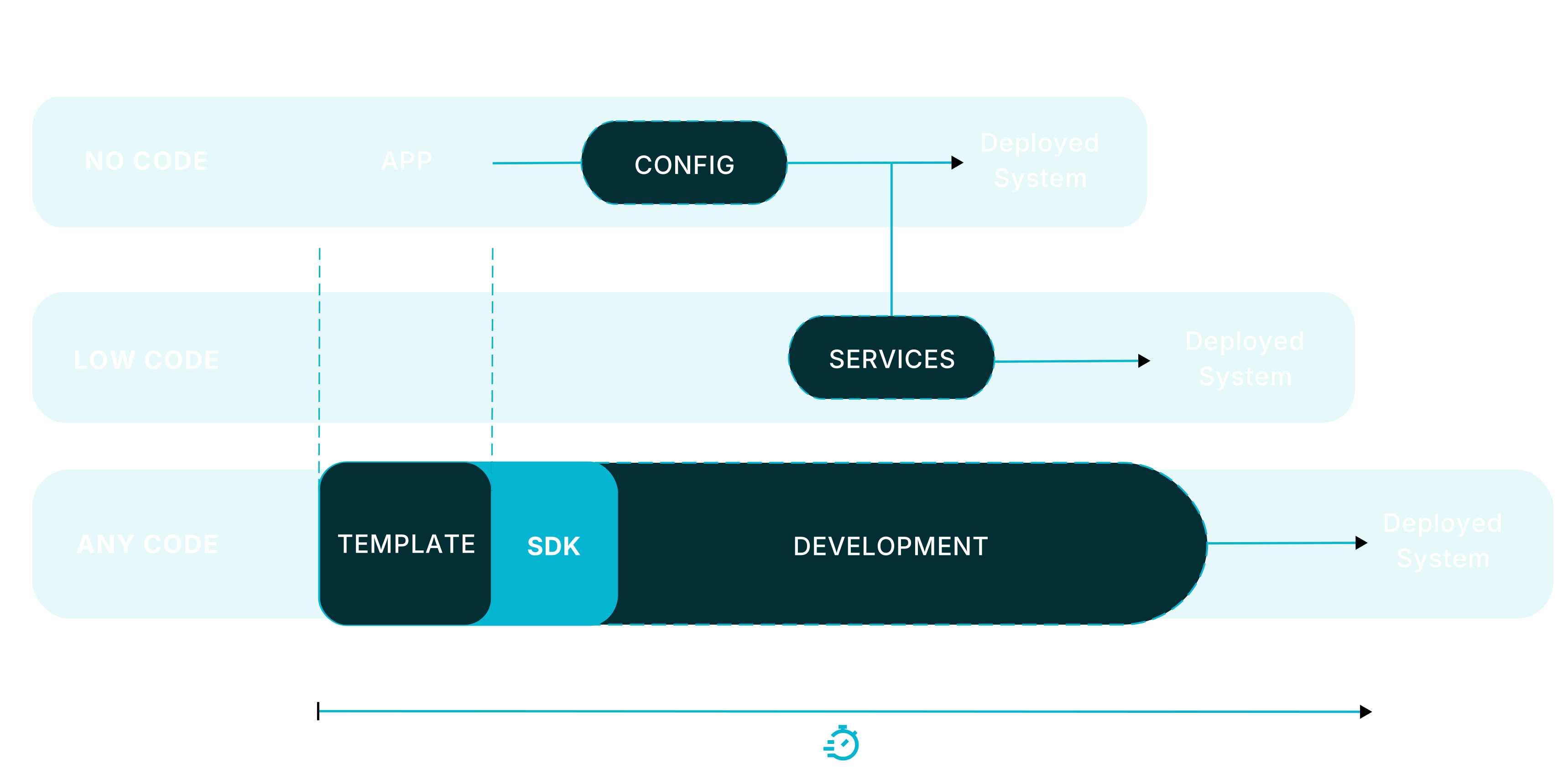
With Motorcortex you start with a No-Code turn-key, feature-rich application that covers a large part of your initial software needs. Add the missing features using Low-Code programming environment or dive into full development with the Motorcortex SDK and write Any-Code.

  • Start fast

    No-Code

    Turn-key apps for your Machine

  • Add what you need

    Low-Code

    Extend your application with Services

  • Take full control

    Any-Code

    Motorcortex SDK and Application Templates

Real-Time Digital Twin

No matter which route you take, everything can be simulated or partially simulated before deployment, and your virtual code is identical to your production code.

Develop, test, and deploy — all within one consistent ecosystem.

Grid
  1. No-Code

    Turn-key application that gets you started quickly

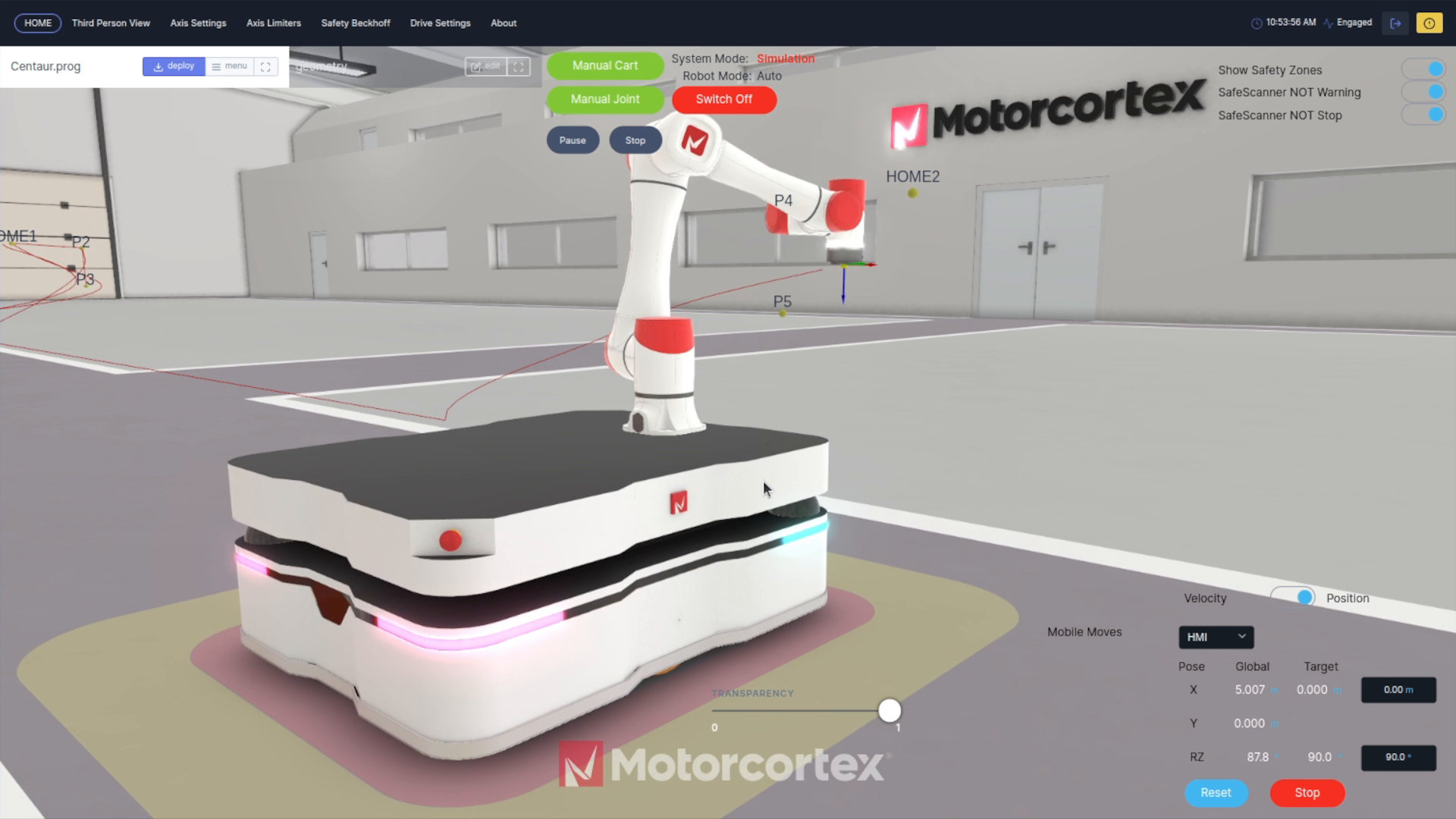
    The Motorcortex-Robot App can be deployed to your controller right away. Out of the box there is support for Robot Manipulators (anthropomorphic, delta, scara, hexapods), Vehicles (2 wheel differential steering, meccanum, swerve wheels, kiwi drive) and Machines with any number of servo-axes. It has an Editable Web-based Operator Interface including point-and-click robot programming.

  2. Low-Code

    Add what your application needs

    Extend the Motorcortex Robot-App with Services (e.g. Python scripts, ROS Nodes) that can run directly from the Motorcortex embedded controller or from and external PC. Services use the open source Motorcortex API to subscribe to data streams and send data to the Motorcortex application. Convenient client Templates are available for Python, Javascript, C#, C++, Rust,.

    Third party software is also supported, like ROS/ROS2, Localization/Navigation software, Vision software. These can be deployed as Docker / Podman Containers to the embedded system straight from the Motorcortex portal.

  3. Any-Code

    Build your own

    At its core, Motorcortex provides an RTOS and a motorcortex-core library that provides an abstraction for Hard-Realtime, EtherCAT and a super-fast Middleware, so you do not have to worry about the foundation of your application.

    On top of this Motorcortex provides real-time capable libraries for Motion Control, Kinematics and Dynamics, Hydraulics, 6D Trajectory Generation, Haptics and many more.

From Simulation to Reality

Digital-Twin: Develop and Test Software while your machine is being built.

Digital Twin

The built-in Digital Twin creates a virtual copy of your machine that behaves exactly like the real one. A Motorcortex Application can be used as a hard-realtime simulator, simulation all hardware or just certain devices that are not yet available.

Developers can design, simulate, and test a virtual copy of their machine while the mechanical build is still in progress — enabling parallel development that accelerates your project timeline by months or even years.

  • Parallel development

    Design and test software while hardware is still being built.

  • Machine Learning

    Collect and train data in realistic, simulated conditions.

  • Operator training

    Prepare operators using the exact same interfaces as the production system.

  • System Validation and Test

    Validate control system behavior and performance. Use scripts to automate testing.

  • Diagnostics

    Replay, simulate and analyze behavior.

Tools

Develop with Motorcortex

Motorcortex.io is a browser-based portal with all the tools you need to build your applications, plus ready-made apps you can use as examples or templates.

Embedded apps are built in C++ with CMake, so you can use your preferred IDE. Plugins for CLion and VS Code streamline setup and development.

Portal

Motorcortex.io is the online environment to manage your software projects. It allows collaboration with your team and your clients; create a new application or configuration and share it with your client to deploy it on his machine.

Assets store

A Store with pre-configured system templates to jump-start your project.

Deploy - Fetch

Deploy to your Controller and fetch updates back to the cloud.

Grid

With GRID you can design User Interfaces (UI) of Dashboards and link them to application data. Deploy the UI with a single button click from your browser to the machine.

Desk

Use DESK to show realtime data of a running Motorcortex application, modify your configurations and plot or record data direct;y from your browser.

Ecat

Scan your devices and add them to the hardware configuration. Change their names and link the hardware to software parameters is this easy to use tool.